Cara Mendapatkan Bitcoin Gratis

Bitcoin adalah sebuah uang elektronik yang di buat pada tahun 2009 oleh Satoshi Nakamoto. Nama tersebut juga dikaitkan dengan perangkat lunak open source yang dia rancang, dan juga menggunakan jaringan peer-to-peer yang menghubungkan semuanya. Tidak seperti mata uang pada umumnya, bitcoin tidak tergantung dengan mempercayai penerbit utama. Bitcoin menggunakan sebuah database yang didistribusikan dan menyebar ke node- node dari sebuah jaringan P2P ke jurnal transaksi, dan menggunakan kriptografi untuk menyediakan fungsi-fungsi keamanan dasar, seperti memastikan bahwa bitcoin-bitcoin hanya dapat di habiskan oleh orang mempunyainya, dan tidak boleh dilakukan lebih dari satu kali.


Desain dari Bitcoin memperbolehkan untuk kepemilikan tanpa identitas (anonymous) dan pemindahan kekayaan. Bitcoin - bitcoin dapat di simpan di komputer pribadi dalam sebuah format file wallet atau di simpan oleh sebuah servis wallet pihak ketiga, dan terlepas dari semua itu Bitcoin - bitcoin dapat di kirim lewat internet kepada siapapun yang mempunyai sebuah alamat Bitcoin. Topologi peer-to-peer bitcoin dan kurangnya administrasi tunggal membuatnya tidak mungkin untuk otoritas, pemerintahan apapun, untuk memanipulasi nilai dari bitcoin - bitcoin atau menyebabkan inflasi dengan memproduksi lebih banyak bitcoin.

Singkatnya bitcoin adalah mata uang elektronik yang didasari oleh teknologi yang paling baru dan mulai menjadi pilihan sebagai pengganti emas. Bitcoin sendiri dibuat dari gabungan berbagai teknologi dari cryptografi, ekonomi dan network membentuk sebuah program yang terdiri dari network peer-to-peer yang kokoh dan hampir mustahil untuk diserang, teknologi atau lebih tepatnya mata uang baru ini disebut cryptocurrency. Bitcoin ini pada akhirnya berfungsi sebagai mata uang.
 
Berdasarkan DailyDotCom penggunaan Bitcoin atau mata uang cryptografi ini terus meningkat drastis. Tahun 2012 lalu titik transaksi tertinggi berhasil diraih dengan transaksi mencapai 58.000 per hari. Sekarang setelah tahun baru transaksi Bitcoin terus stabil pada titik 50.000 transaksi per harinya. Pengguna internet terus antusias menggunakan bitcoin sebagai mata uang internet yang sepenuhnya bersifat digital. Bahkan perusahaan raksasa seperti Wordpress sekarang menerima mata uang bitcoin dalam penyediaan jasanya. Berdasarkan Forbes bitcoin menjadi alternatif mata uang yang populer karena kemudahannya dalam penggunaannya, sistem yang terdesentralisasi dan akses yang tersedia untuk semua orang menjadi daya tarik utama dalam mata uang ini.
 
Bahkan Bitcoin sendiri pernah dikabarkan menjadi saingan utama industri perbankan. Macleans menuturkan bahwa Bitcoin berbeda dengan mata uang online yang pernah ada di internet. Sistem yang terdesentralisasi berarti peredaran uang tidak bisa diatur oleh siapapun. Dan layaknya uang kas, transaksi bitcoin terjadi langsung dari orang ke orang tanpa perantara sehingga biaya pengiriman sangatlah minim dan transaksi ini terjadi tanpa ada batasan apapun. Sistem yang terdesentralisasi juga menjaga keamanan privasi pemilik bitcoin dan memastikan bahwa uang bitcoin mereka tidak bisa dibekukan oleh siapapun. Penggunaan bitcoin sendiri juga terus meningkat. Mt.Gox, exchanger bitcoin terbesar menunjukkan bahwa mereka telah melakukan penukaran bitcoin dengan dollar hingga mencapai titik fantastis sebesar $3 juta dollar dengan nilai tukar 1 bitcoin untuk 13 dollar. Kedepannya bitcoin diramalkan akan terus meningkat dan pengguna bitcoin akan terus bertambah. 
 
Sebelum mendapatkan Bitcoin, anda harus memiliki wallet tempat menyimpan Bitcoin yang anda dapatkan. Untuk membuat wallet bitcoin, silahkan ikuti petunjuk dibawai ini :
  • Buka situs Blockchain atau klik DISINI.
  • Klik Wallet (Dompet).
  • Jika mau, anda dapat merubah bahasa dengan bahasa yang anda inginkan (lihat kotak merah dengan angka 2 pada gambar dibawah).
    • Setelah mengikuti langkah pada Poin 2 anda akan dibawa pada halaman berikut :
    • Klik Buat Dompet baru dan anda akan masuk pada halaman form pendaftaran.
    • Untuk mengisi form pendaftaran silahkan mengikuti langkah-langkahnya sebagai berikut
      1. Alias(Email) : di isi Email anda
      2. Password : password anda harus berisi minimal 10 karakter dengan gabungan huruf, angka dan simbol. Ingat password yang anda buat, karena tidak akan ada fitur reset password yang akhirnya dapat membuat anda kehilangan akun wallet anda.
      3. Captcha : isi captcha sesuai dengan karakter yang muncul diatasnya.
      4. Jika sudah selesai, klik Continue (Terus) dan anda dapat login ke wallet yang sudah anda buat tadi.
    • Setelah anda login ke wallet yang telah dibuat tadi, anda akan diberikan alamat wallet yang menjadi sarana untuk menerima dan mengirim bitcoin. Alamat wallet anda berupa gabungan angka dan hutuf contohnya :
    Sumber : http://amriawan.blogspot.co.id/2014/01/cara-mendapatkan-bitcoin-gratis.html


Xiaomi Mi Note 2 Review: More Than Just A Galaxy Note 7


 Xiaomi’s Mi Not 2 hasn’t been getting the respect it probably deserves. After all, the phone was overshadowed at its own very launch event by Xiaomi’s other new phone, the bezel-less Mi Mix. And even when media and reporters (including myself) wrote about the Mi Note 2, we mentioned how much it looked like a Samsung Galaxy Note 7.

Let‘s address the “Note 7 ripoff” issue first. Yes, just like Samsung’s now dead phone, the Mi Note 2 has a 5.7-inch display with dual curved screens and back that meets in the middle for a perfectly symmetrical look. But it’s not fair to just dismiss Xiaomi’s product as copycat, because Xiaomi was actually the first phonemaker to introduce a curved glass back (before Samsung did it with the Note 5). And as Hugo Barra told Engadget, there’s really only one way you can do a curved screen, so this “curved front and back meet in the middle” design was just the logical next step for the company. Also, the Note 7 was introduced just two months ago — it’s almost certain that Xiaomi had begun development on the Mi Note 2 already. 


I’ve been using the Mi Note 2 for four days and much like Xiaomi’s last flagship phone, the Mi 5, this is a beast of a phone with fast performance, solid camera and great build quality. And yes, while the Mi Mix is way more intriguing as a device (I’ll have a review of that coming later this week too), the Mi Note 2 is probably a more usable day-to-day phone.

That’s because while the Mi Mix is eye-catching, it’s a concept phone in every sense of the word (more on that in my review later). The Mi Note 2, however, is like the many great flagship phones of 2016 — except it’s got the latest and best Snapdragon chip, the 821. In both real world usage (like zipping between apps and editing videos via Viva Video) and benchmark testing, the Mi Note 2 comes out at the top of every Android phone I’ve tried so far this year. Oh, and I’m on the lower tier 4GB RAM version, not the maxed out one with an extra 2GB of RAM.

Ben Sin , 

Contributor

I cover consumer tech in Asia, focusing on gadgets and gaming

Opinions expressed by Forbes Contributors are their own.
The Xiaomi Mi Note 2. Photo: Ben Sin

The Xiaomi Mi Note 2. Photos: Ben Sin

Xiaomi’s Mi Not 2 hasn’t been getting the respect it probably deserves. After all, the phone was overshadowed at its own very launch event by Xiaomi’s other new phone, the bezel-less Mi Mix. And even when media and reporters (including myself) wrote about the Mi Note 2, we mentioned how much it looked like a Samsung Galaxy Note 7.

Let‘s address the “Note 7 ripoff” issue first. Yes, just like Samsung’s now dead phone, the Mi Note 2 has a 5.7-inch display with dual curved screens and back that meets in the middle for a perfectly symmetrical look. But it’s not fair to just dismiss Xiaomi’s product as copycat, because Xiaomi was actually the first phonemaker to introduce a curved glass back (before Samsung did it with the Note 5). And as Hugo Barra told Engadget, there’s really only one way you can do a curved screen, so this “curved front and back meet in the middle” design was just the logical next step for the company. Also, the Note 7 was introduced just two months ago — it’s almost certain that Xiaomi had begun development on the Mi Note 2 already.
The dual curves on the front and back of the phone gives it a really slim feel.

The dual curves on the front and back of the phone gives it a really slim feel.

I’ve been using the Mi Note 2 for four days and much like Xiaomi’s last flagship phone, the Mi 5, this is a beast of a phone with fast performance, solid camera and great build quality. And yes, while the Mi Mix is way more intriguing as a device (I’ll have a review of that coming later this week too), the Mi Note 2 is probably a more usable day-to-day phone.

That’s because while the Mi Mix is eye-catching, it’s a concept phone in every sense of the word (more on that in my review later). The Mi Note 2, however, is like the many great flagship phones of 2016 — except it’s got the latest and best Snapdragon chip, the 821. In both real world usage (like zipping between apps and editing videos via Viva Video) and benchmark testing, the Mi Note 2 comes out at the top of every Android phone I’ve tried so far this year. Oh, and I’m on the lower tier 4GB RAM version, not the maxed out one with an extra 2GB of RAM.
Recommended by Forbes

(The Mi Note 2 scored a 1828 on Geek Bench’s single core test and 4039 on the multi-core, that beats both the Galaxy S7′s 1589/3795; Google Pixel XL’s 1607/4147, but falls short of the iPhone 7 Plus’ 3464/5688).

As I mentioned in my Mi 5 review from earlier, Xiaomi’s custom Android skin, named MIUI (now in its 8th version), is a lot cleaner than people in the west give credit for. I particularly love that it allows you to customize the phone’s hard buttons. For example: the phone comes with the back button assigned to the right of the home button, but I can swap it to the left. And the home button/fingerprint sensor, although it’s “clickable” like Samsung phones and older iPhones, Xiaomi gives the option to activate via touch. I much prefer this because having to press down on a physical button feels outdated in a world of touch buttons (even Apple’s done away with that on the iPhone 7. Samsung phones are the only ones left).

Despite the Mi Note 2 having the same type of curve as the Note 7/S7 Edge, I had virtually no erroneous touches on the curved screen during my four days of use. This is amazing, because I had serious problems using the S7 Edge without accidentally tapping something on the screen. I think part of this is due to the curves on the Mi Note 2 not being as drastic, and partly because MIUI’s palm rejection software is just much smarter than the one on Galaxy phones.+

One of the new additions to the MIUI 8 that’s very useful is the “second space” feature, which essentially partitions a portion of your phone away from the main device’s hard drive, so you can store sensitive information you might not want other people to see. Much like the Note 7′s Secure Folder, you can download second copies of apps onto the second space, and it’ll behave like a completely separate app from the first copy. That means you can have two Google Play accounts, or two WeChat apps (logged onto two different accounts) on the same phone. Switching back and forth between the “main” phone and the second space takes only a tap, and everything is locked via password, PIN or fingerprint scan.


Speaking of fingerprint scanning, holy crap, the sensor on the Mi Note 2 is fast. This might be the fastest fingerprint sensor I’ve ever used, topping even the former king, Huawei P9. It’s so fast, I never see the lockscreen when I press on the sensor when the phone’s in a sleeping state — it just goes straight to the home screen instantaneously.

The one area the Mi Note 2 disappoints slightly is the camera. Despite some gaudy specs (22.5 MP, f/2.0), I found the photos to range from solid to good, which isn’t bad by any means, but the bar for smartphone photography is set so high. Here are some samples. 


Sumber : http://www.forbes.com/sites/bensin/2016/11/05/xiaomi-mi-note-2-review-more-than-just-a-galaxy-note-7-lookalike/2/#3a73b70d607a 


Xiaomi Mi MIX Review – all screen, almost all of the time!


XIAOMI MI MIX


Positives
Flashy design
Almost no bezel!
Snapdragon 821 works great
High storage capacity
Great battery life despite screen size
Software includes features Western UIs lack
Negatives
Though flashy, design is far from accessible
Near bezel-less 17:9 display gains bezels when viewing typical content
MIUI a bit of mess, mostly due to lack of app drawer
Cameras are aggressively average
Front facing camera location not at all ideal

Xiaomi made quite a splash with what they called a ‘concept phone”; a phone that, they hope, will give us a glimpse into a future where smartphones are slabs of glass that project the magic that lies within. Considering we don’t have the technology (yet) that can make our phones achieve this, they went with the best we can do right now – a phone that is all display, all the time.
I’ve been using it for some time now, trying to figure out if a phone that is basically entire display actually makes sense for our daily lives. After all, doing this to a phone means that some changes have to be made to the very way that we see and use our smartphones. Does it work and is this the future of smartphones? Let’s find out in this, our Xiaomi Mi MIX review.


WHAT ICLOUD REMOVER 1.0.2 Software CAN DO?

 
  1. Reset & remove old ICLOUD Account FOREVER
  2. DISABLE Find MY PHONE Activation Lock
  3. Fix "No Service" PROBLEM.
  4. GIVE Usage of FILE SYSTEM About IOS 10, 9, 8, 7.1.2 and below.
  5. LET YOU Set up ALL APPLICATIONS That you would like to use
  6. iCLOUD UNLOCK As well as BYPASS & REMOVE!
  7. ADD new iCloud Account in your Device
 Our iPhone devteam worked 5+ months to find a solution to remove & Bylpass iCloud, and because we know that the iPhone bootrom is extremely small and quick and any take advantage of give many mistakes, we found a couple of methods to unlock, bypass and also fully activate any iPhone, iPad and iPod touch. All this methods has been integrated in a software package tool named iCloud Remover 1.0.2. This software is completely free for personal usage, and every version is fully encrypted with HUID (Hardware Distinctive Id encryption).


Marshmello Alan Walker


Cara Super Mudah Memindahkan Foto dari iPhone ke Laptop atau PC Windows

Cara memindahkan foto dari iphone ke laptop pc windows

Bagaimana sih cara memindahkan foto dari iPhone ke laptop atau PC dengan Windows 10 atau 8? Itu mungkin menjadi pertanyaan umum buat kamu yang baru menggunakan iPhone, baik itu iPhone 4, 5, 6, atau 7.

Semakin majunya era teknologi terkadang memaksa beberapa perubahan yang sedikit membuat bingung. Salah satunya merupakan bagaimana mengaktifkan personal hotspot di iOS 10 yang sedikit berbeda dari sebelumnya. Namun beberapa perubahan tersebut bisa juga membuat hal menjadi lebih mudah seperti cara memindahkan foto dari iPhone ke laptop atau PC Windows.

Kalau kamu sebelumnya merupakan pengguna Android, ada juga cara sangat mudah untuk memindahkan seluruh kontak yang kamu miliki ke iPhone yang harus kamu ketahui. Apple sebagai pembuat iPhone juga ingin memudahkan penggunanya dalam berbagai hal agar semakin betah dengan produk mereka.

Lalu bagaimana cara memindahkan foro dari iPhone ke laptop atau PC Windows? Cukup mudah kok, bahkan kamu tidak perlu install tambahan lain. Berikut tahapan yang harus kamu lakukan untuk bisa memindahkan foto dengan mudah.

Cara Memindahkan Foto dari iPhone ke Laptop atau PC

1. Hal yang pertama harus dilakukan tentu menghubungkan perangkat iPhone kamu ke laptop atau PC dengan menggunakan kabel USB to Lightning yang telah disediakan ketika membeli.
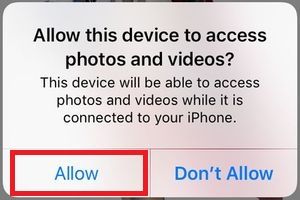
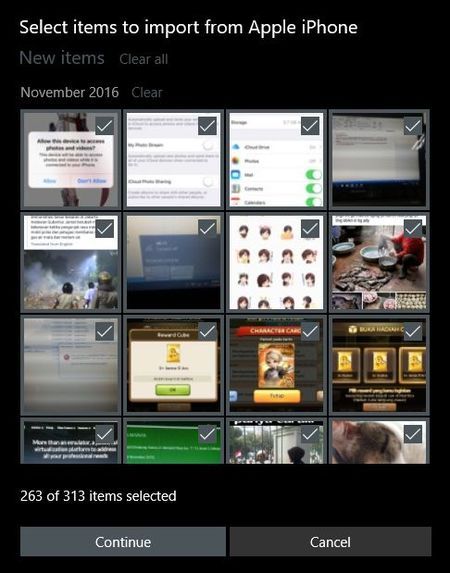
2.  Ketika terhubung akan muncul perintah “Allow this device to access photos and videos” di perangkat iPhone dan pilih Allow untuk mengizinkan akses untuk laptop atau PC.

cara memindahkan foto dari iPhone ke laptop PC allow device

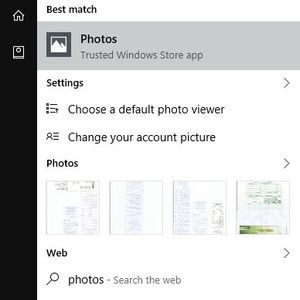
3. Selanjutnya jalankan aplikasi Photos yang juga sudah langsung disediakan oleh Windows.

cara memindahkan foto dari iPhone ke laptop PC Photos App

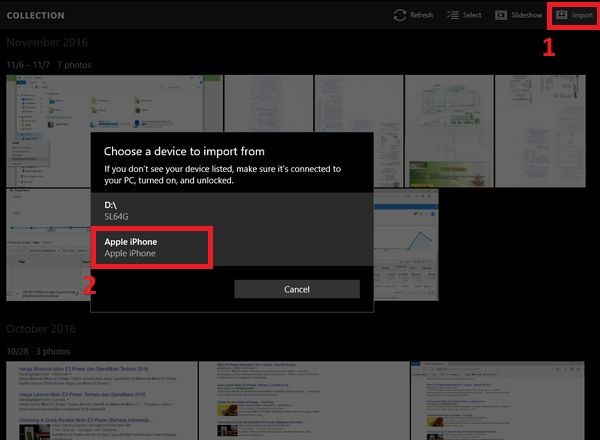
4. Setelah aplikasi Photos terbuka kamu tinggal menekan import dan pilih iPhone kamu.

cara memindahkan foto dari iPhone ke laptop PC Photos Add

5. Kemudian kamu tinggal memilih foto-foto mana saja yang ingin kamu pindahkan. Ketika sudah semua lalu continue untuk mulai memindahkan foto dari iPhone ke laptop atau PC.

cara memindahkan foto dari iPhone ke laptop PC import

Ketika sebelum proses dimulai kamu juga dapat langsung menghapus seluruh foto yang dipilih secara otomatis sehingga penyimpanan internal pada iPhone tidak cepat habis. Selain cara tersebut kamu juga bisa menggunakan layanan iCloud, namun metode ini membutuhkan jaringan internet.
Itu di acara memindahkan foto dari iPhone ke laptop atau PC Windows untuk iPhone 4, 5, 6, atau 7 yang sangat mudah dilakukan.

Sumber : https://gadgetren.com/2016/11/07/cara-memindahkan-foto-dari-iphone-ke-laptop-pc-windows/

10 Fitur Trik iPhone Belum Kamu Ketahui Yang Dirahasiakan Oleh Apple


Trik rahasia iphone iOS
https://gadgetren.com/2016/11/23/trik-fitur-rahasia-iphone-ios/
Di era sekarang ini smartphone bukan hanya sekedar mengirim pesan SMS atau melakukan panggilan telepon saja, tetapi juga mempunyai banyak fitur dan fungsi lainnya. Tidak semua orang tahu seluruh seluk beluk dari sistem operasi yang digunakan pada smartphone tersebut termasuk iOS dari Apple.
Nah, tahukah kamu kalau iPhone punya fitur yang jarang diketahui oleh penggunanya bahkan jarang dibahas oleh pihak Apple sendiri. Nah Gadgetren kali ini berbagi trik iPhone yang sangat berguna untuk dilakukan dalam keseharian. Berikut 10 trik rahasia iPhone yang wajib kamu ketahui untuk para pengguna smartphone Apple.

1. Charge lebih cepat: Buat kamu yang mungkin baterai iPhone telah habis dan ingin buru-buru cepat terisi dapat melakukan charge dengan kondisi iPhone dalam modus Low Power dan Airplane aktif keduanya atau salah satu saja.

2. Clear cache: Kamu dapat membersihkan data yang tidak diingiinkan seperti riwayat pencarian di aplikasi bawaan iPhone dengan cara mengetuk kategori yang terdapat di bagian bawah sebanyak 10x berturut-turut.

3. TouchID lebih akurat: Trik ini lebih berguna untuk iPhone yang menggunakan TouchID generasi awal seperti iPhone 5s atau iPhone 6. Agar TouchID bekerja lebih cepat dan akurat, kamu bisa memasukkan profil jari yang sama beberapa kali.

4. Redial: Buat yang dulu sering menggunakan telepon rumah pasti paham dengan apa itu redial. Di jaman modern gini yang semua kontak sudah tersedia, kamu juga tetap bisa melakukan redial loh. Caranya tahan tombol telepon berwarna hijau di aplikasi telepon beberapa saat.

5. Spotlight: Daripada repot menggunakan kalkulator, kamu bisa menggunakan fitur Spotlight untuk melakukan perhitungan atau melakukan konversi mata uang seperti yang bisa juga dilakukan lewat Google.

6. Clear RAM: Sebenarnya iOS tidak perlu melakukan pembersihan RAM secara berkala karena telah didesain secara efisien. Namun, apa salahnya jika sesekali kamu membersihkan RAM untuk memberikan ruang agar aplikasi dapat bekerja lebih baik. Membersihkan RAM bisa dilakukan dengan cara menahan tombol Power hingga muncul tulisan “Slide to power off” lalu kemudian tekan tombol Home sampai layar berkedip dan kembali ke layar utama.

7. Burst mode: Banyak yang tidak tahu kalau aplikasi kamera di iOS memiliki fitur burst atau mengambil foto secara beruntun. Cara untuk bisa menggunakan burst cukup mudah kok, kamu tinggal menahan tombol kamera ketika ingin mengambil foto.

8. Recently Close Tabs: Tidak sengaja menutup halaman web yang sedang dibaca? Kamu bisa langsung mengembalikannya dengan cara menekan dan tahan simbol + di Safari untuk membuka daftar tab yang belum lama tertutup.

9. Request Desktop Version: Ketika kamu sedang membuka suatu halaman web mungkin terkadang merasa tampilan kurang bagus atau terbiasa melihat versi komputer. Kamu bisa langsung meminta tampilan desktop dengan cara menahan tombol reload yang berada di samping kanan kolom URL.

10. Back Forward: Tidak jarang pengguna smartphone iPhone kesulitan untuk menjangkau tombol back atau kembali yang berada di bagian atas kiri. Nah, di beberap aplikasi kamu bisa menggunakan fitur geser kiri dan kanan untuk berpindah aplikasi.
 
Sumber : https://gadgetren.com/2016/11/23/trik-fitur-rahasia-iphone-ios/